One workspace for the whole recruiting desk.
RecruiterDesk brings applicant tracking, candidate and client management, and a recruiting CRM into one place. It starts where the work starts, with the client's requirement, and carries it through to a submission you can stand behind. The product does the work; you just confirm.
From a JD to a defensible shortlist, in three steps.
Paste the JD
RecruiterDesk reads it and drafts a weighted fitment checklist. Where the JD is vague, it asks you a couple of quick questions, you answer, and you approve the bar before you source.
Source and score
Every candidate is scored against that checklist, with the reasoning shown. A weak fit is obvious early, and a hard knockout stops a wrong submission before it goes out.
Submit with proof
Send a branded report from your own name, with the scorecard attached, and move the candidate through a clean pipeline to placement.
The requirement, turned into a scorecard.
RecruiterDesk reads the JD and drafts the checklist: weighted must-haves, nice-to-haves and hard knockouts, plus the questions worth asking. You refine it in a short back-and-forth and approve it, so the bar is set before you source. Every score is explainable, and you decide.
- Knockouts gate a weak submission before it reaches the client
- Weighted, explainable scoring, never a silent AI verdict
- Every submission carries its scorecard
Every mandate, every candidate, one view.
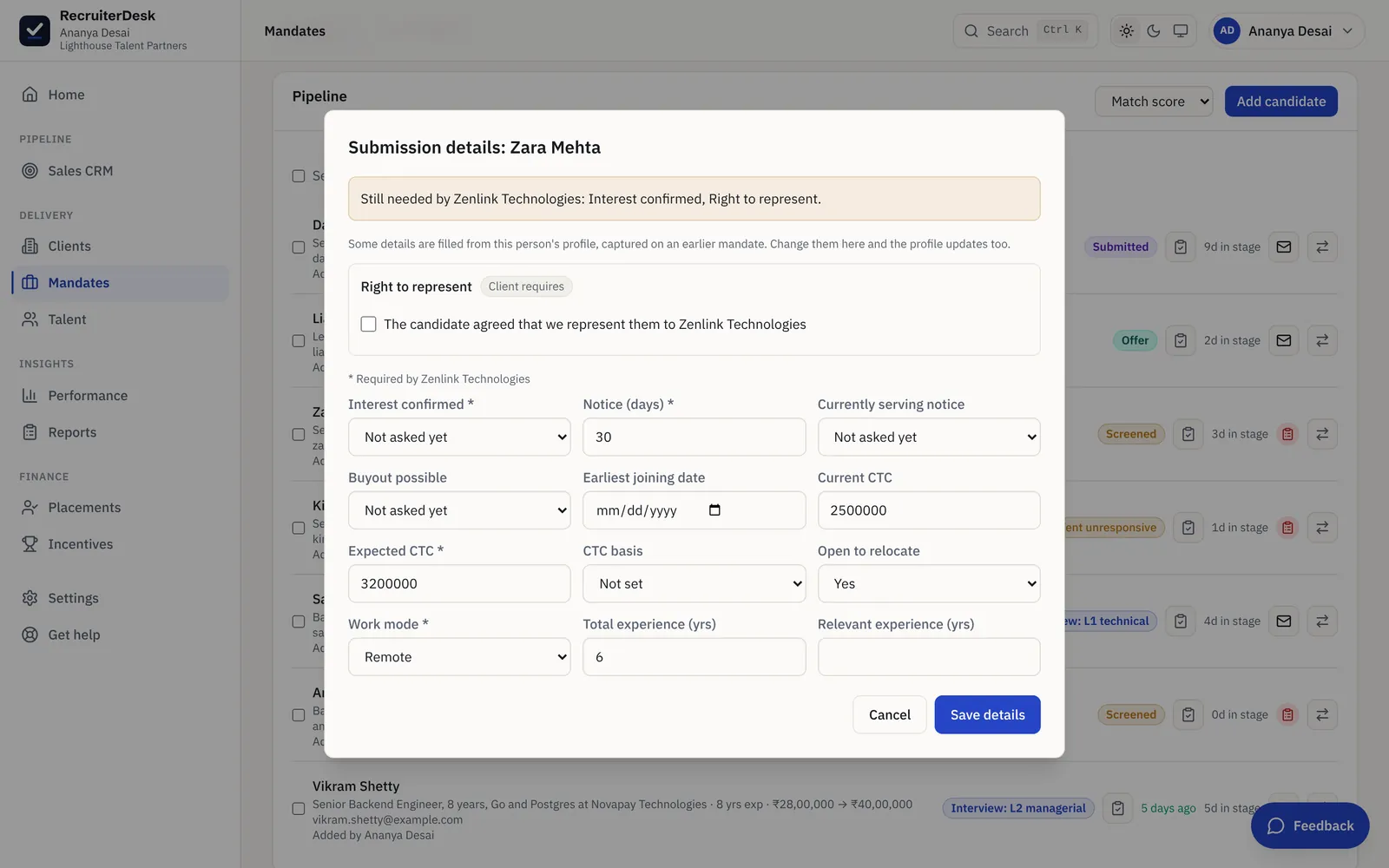
Candidates, clients, mandates and pipeline are one connected set of records, not four sheets. Move people through clear stages that follow each client's interview rounds, fill submission details in a popup without leaving the pipeline, and never rebuild a status sheet before a client call again.
- One connected record for every client, mandate and candidate
- A held submission asks for exactly what the client is missing
- Share a no-login review link and get a yes, maybe or pass on each
A sales CRM for the clients you are chasing.
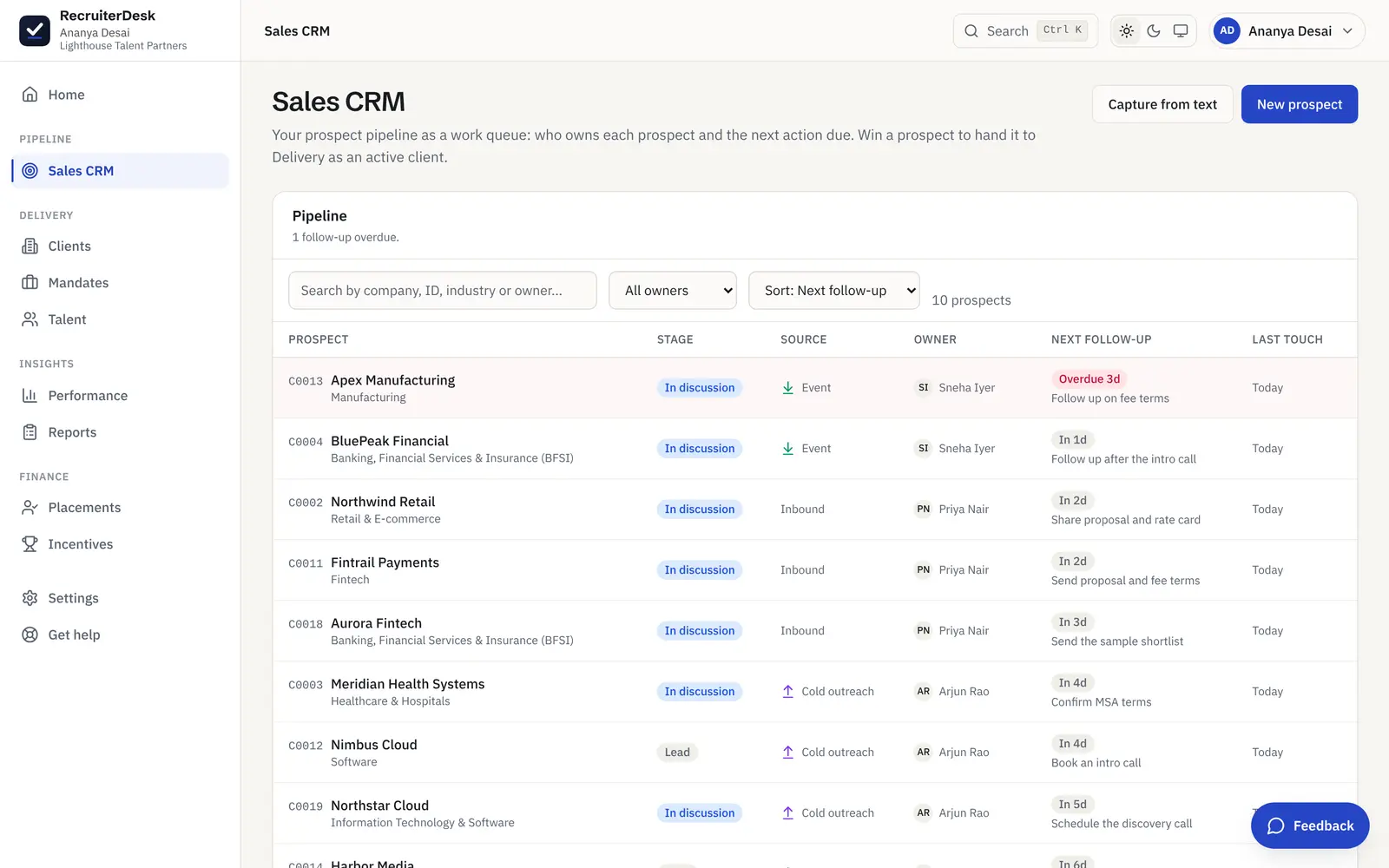
New business runs on the same desk. The Sales CRM is a work queue of prospects, sorted by what is due, so every lead has an owner and a next follow-up with a date. Nothing goes cold for want of a next step, and a won prospect becomes an active client in one move.
- Overdue and due-today follow-ups surfaced first
- An owner and a next action on every prospect
- Won prospects carry their notes straight into delivery
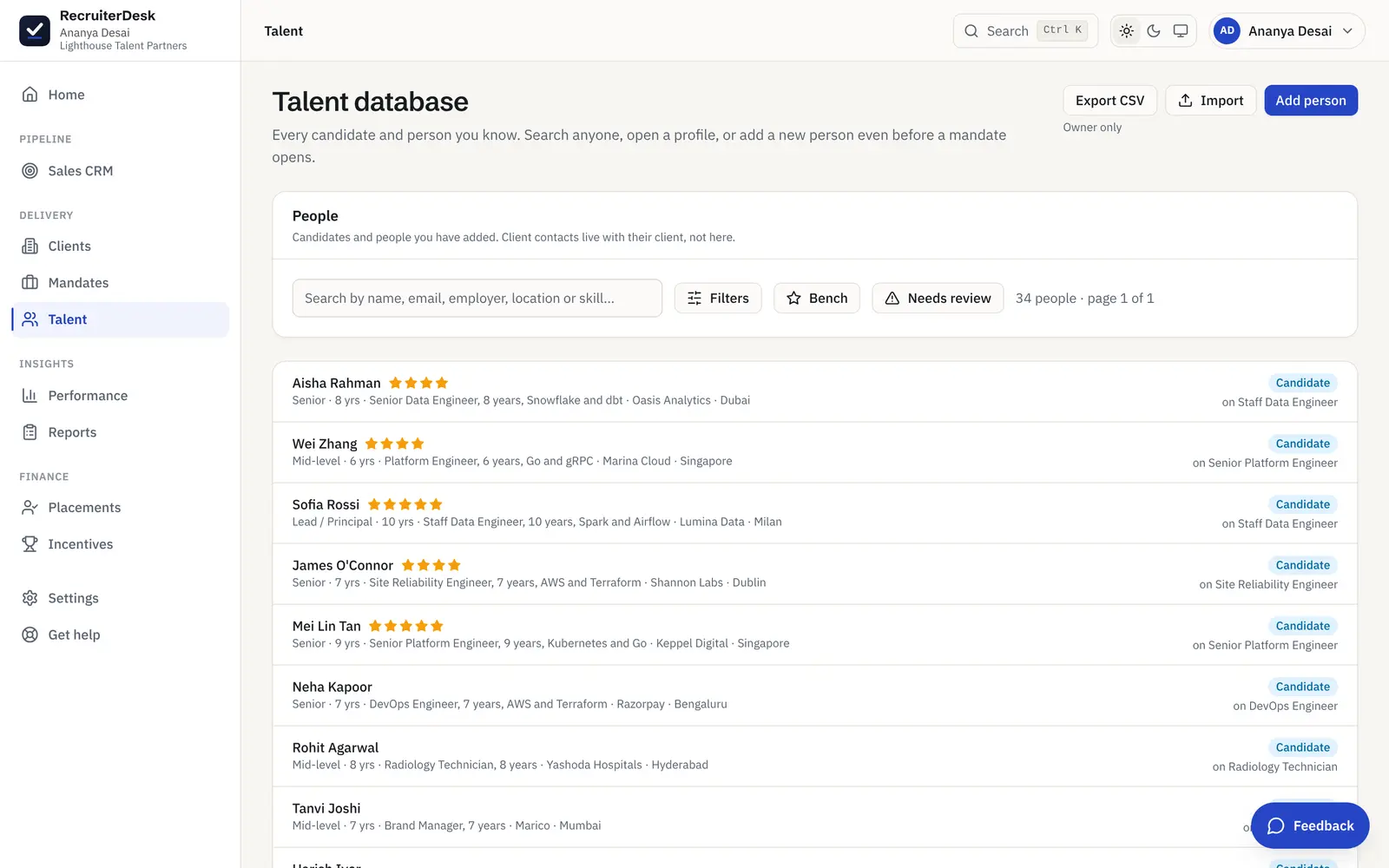
Find anyone you know in seconds, and reuse them.
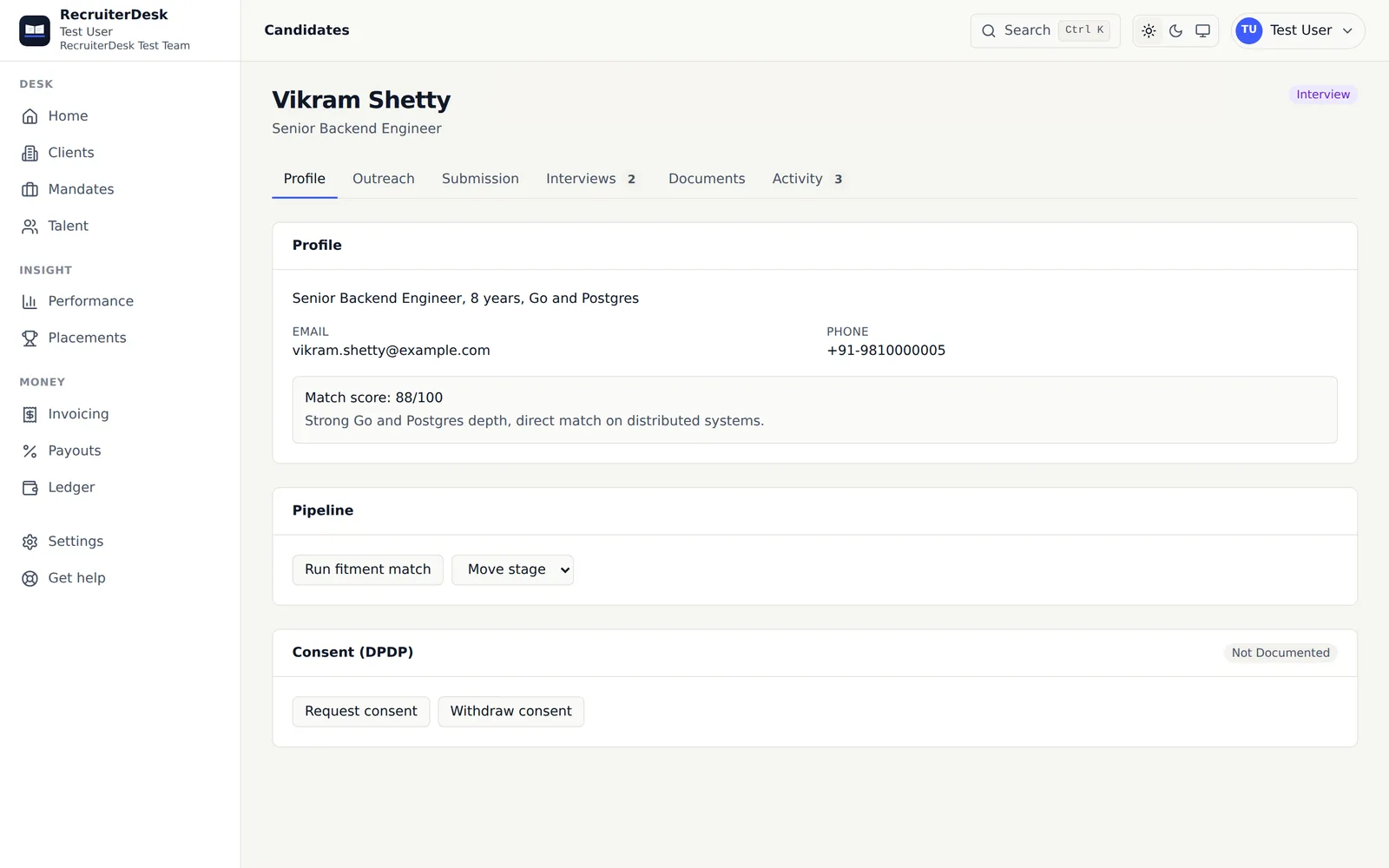
Every candidate and person you have worked with, searchable by name, skill, employer or location. Add someone before a mandate even opens, and bring a backlog in fast: drop a batch of resumes as PDF, DOCX or a ZIP and each one is read into a record. When a new mandate has a fitment checklist, RecruiterDesk ranks the people already in your pool against it, so your first shortlist can come from candidates you know.
- Suggested matches from your talent pool, ranked by the checklist
- Bulk resume import that parses each CV for you
- Export your records to CSV whenever you want
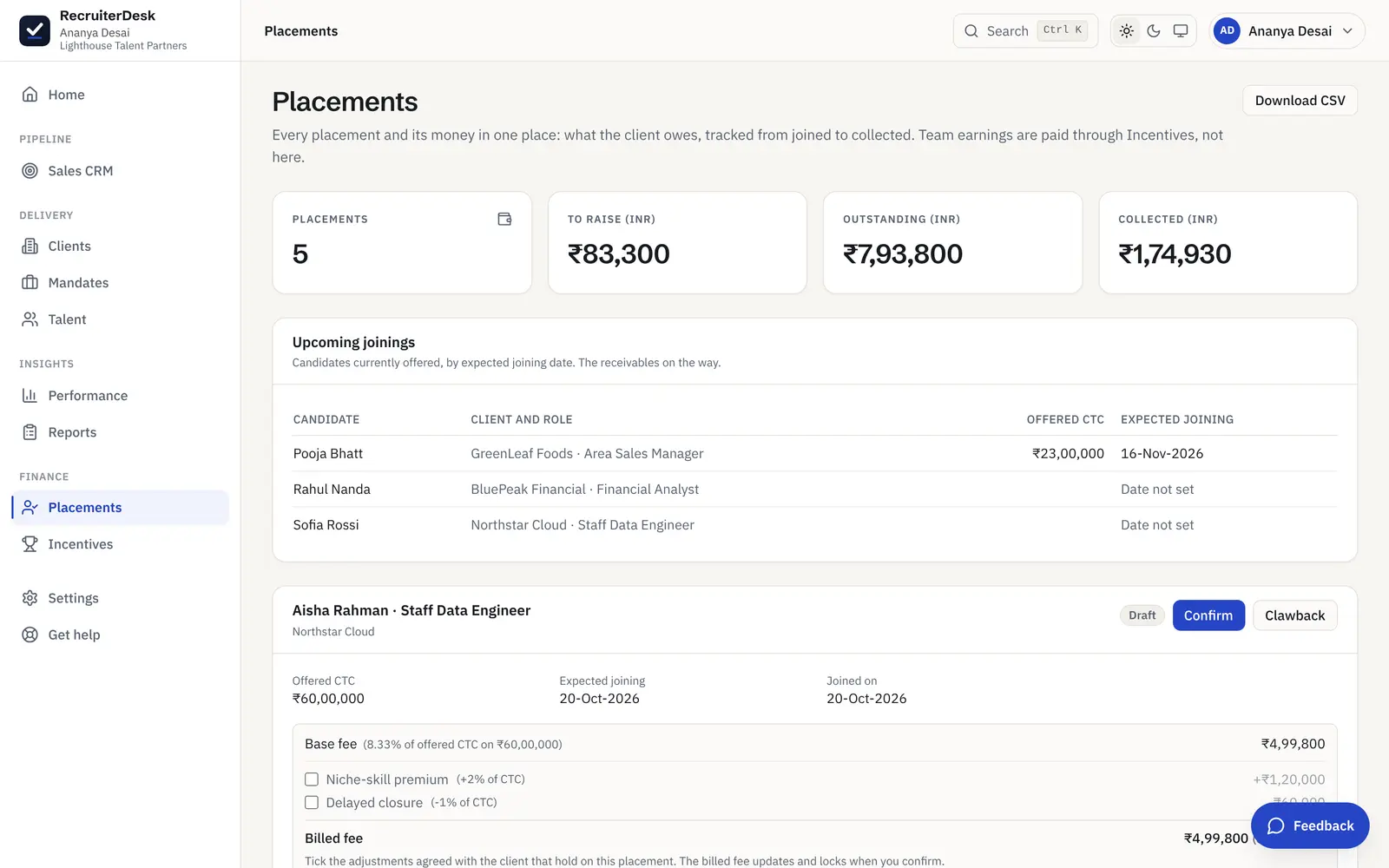
Every placement and its fee, in one place.
Record a placement at the offered CTC and the fee is worked out from the client's terms, so no one types a number. Placements and net fees are tracked together, and on a team the money side flows into settlements: the client receivable and each recruiter's payout, ready to confirm.
- Fees derived from the client's commercial terms
- Placements and net fees in one view
- Settlements draft the receivable and the payout
Talk to candidates and clients from where you work.
Email from your name
Send and track candidate and client email inside RecruiterDesk, going out under your identity so replies land in your own inbox.
WhatsApp click-to-chat
Open a chat with a candidate in one tap, straight from the number on their record, in your own WhatsApp.
Interview scheduling
Book an interview and email everyone a calendar invite, or send a no-login link and let the candidate pick a slot, filled from the client's interview availability in a tap. It books here either way, and both sides get a calendar file.
Follow up today
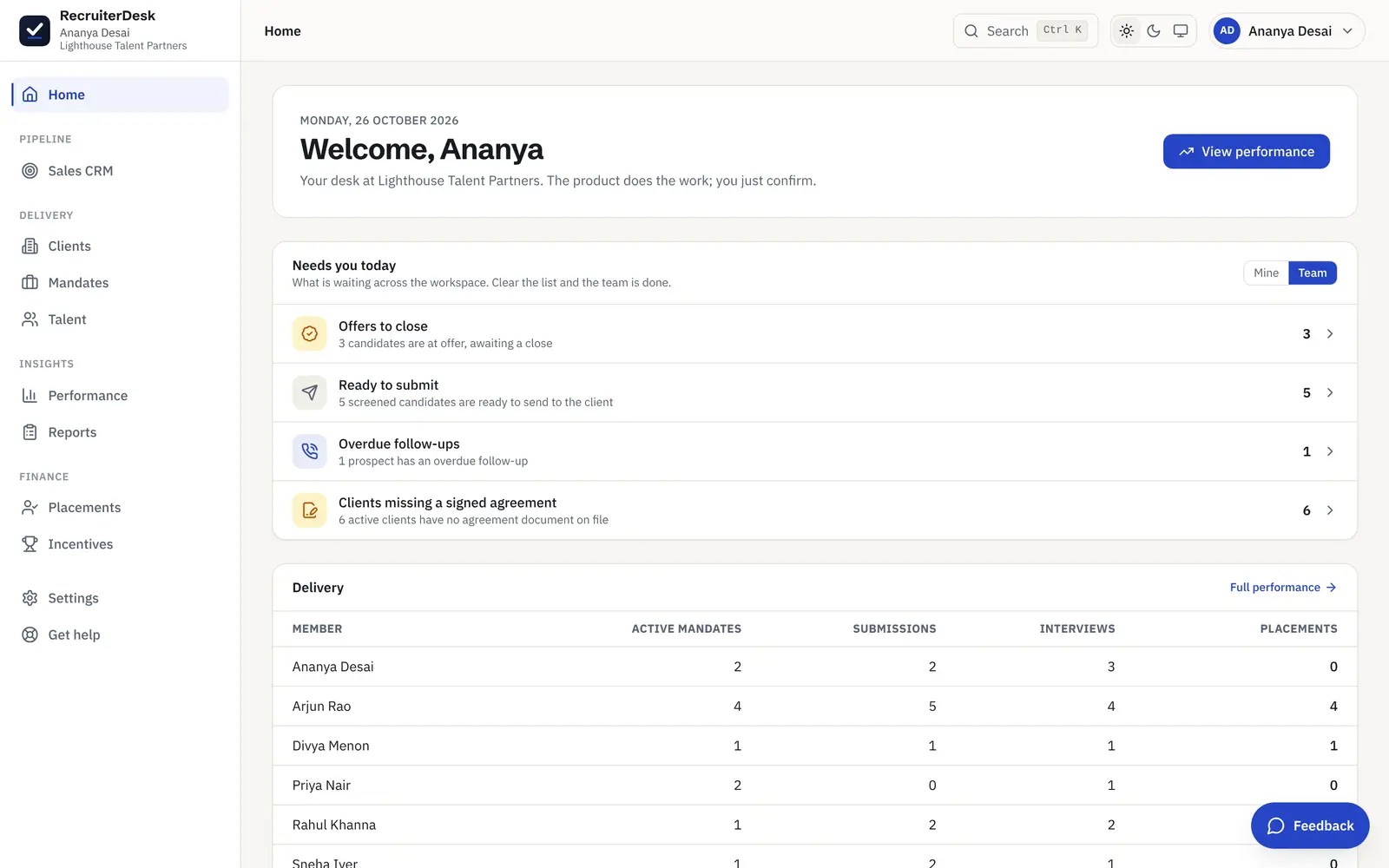
A pre-submission candidate who has gone quiet surfaces on Home with the one next nudge to send, email, then WhatsApp, then a call, and clears the moment they reply or move, so a warm candidate does not slip.
Answers kept for the role
Save the answer to a question candidates keep asking, CTC range, notice, WFH, once on the mandate, and drop it into the next message in one tap.
Your data comes in easily and leaves easily.
Bring your candidates' CVs in
Drop a batch of candidate CVs as PDF, DOCX or a ZIP and each one is read into a candidate record, with duplicates matched on email and phone so the same person is not added twice.
A public job page
Publish a role to a page candidates apply through, with consent captured up front and the client name masked until you choose to name them.
Your data, protected
Candidate consent, withdrawal, export and deletion are built in per person, and you can take your records out to CSV at any time. No lock-in.
The full set, in plain language.
Fitment checklist
A weighted, explainable checklist behind every mandate, drafted for you and approved before you source.
One connected desk
Clients, mandates, candidates and pipeline as one linked set of records, not four spreadsheets.
Sales CRM
A prospect pipeline as a work queue, with an owner and a next follow-up on every lead you are chasing.
Talent database
Every person you know, searchable in seconds, with bulk resume import to fill it fast.
Talent-pool suggestions
For a new mandate, get people already in your database ranked against its fitment checklist, so you shortlist who you know before you source cold.
Client review link
Share a shortlist on a no-login page and get a yes, maybe or pass on each candidate, back on the mandate.
AI drafts, you confirm
One-click drafts of an outreach email or a submission note, from the role and your own fitment. Everything client-facing is your own input; you edit any draft and decide what is sent.
Branded submissions
A clean report from your own name, with the fitment scorecard attached, in a click.
Submissions in the client's format
Map a client's Excel or CSV submission tracker once, then download submissions in that exact column layout, for one mandate or across the client.
A readiness gate per client
Tick what each client needs complete before a profile goes out, record right to represent once per client with a date, and get a flag when a person was already submitted to that client.
The client's interview rounds
Define a client's rounds once. Moving to Interview offers the first round, Next round moves on, and the stage label shows where each candidate is, while the standard stages stay the same for every client.
Details without leaving the page
Submission details open in a popup over the pipeline or the candidate. A held submission asks for exactly what the client is missing, with Save and submit.
Asked once, carried forward
Notice, buyout, joining date, CTC basis, relocation and work mode stay on the person's profile and fill in on their next mandate, so no one is asked twice.
History follows the person
If a candidate withdrew or took a counter-offer before, a Before chip shows the role, client, round and date wherever they are added again. It never affects the fit score.
Confidential resume share
Share a resume with a client with the phone, email and LinkedIn covered and the name kept, so they assess the person without a direct line around you. Every page can carry a sourced-by stamp too.
Scheduling and email
Set an interview time yourself or let the candidate self-schedule from a no-login link, with tracked email from your own identity in the same flow.
Public job page
Publish a role to a page candidates apply through, with consent captured and the client name masked.
Performance and reports
The funnel, source ROI and a fee forecast, plus rejection reasons, a pipeline revenue forecast and CSV or Excel exports you can generate when you need them.
Compliance built in
Consent, export, deletion and an audit trail, so candidate data is handled to a proper standard.
Works on your phone
A responsive app that runs cleanly at 360px, because that is where a lot of the day happens. Install it to your home screen and it opens in its own window and keeps itself current as new releases ship.
The desk, part by part.
Applicant tracking system
Every open role on a real pipeline, each candidate scored against the mandate and moved through clear stages to a placement.
Learn moreRecruitment CRM
Your prospect pipeline as a work queue, with an owner and a next follow-up on every lead, and won clients handed to delivery.
Learn moreAI recruitment software
The AI reads a JD, drafts a weighted fitment checklist and scores every candidate with reasons. You confirm the call.
Learn moreCandidate database
A searchable talent pool with tiers and seniority, your own people ranked against each role, and a bench of who is open to move.
Learn moreCandidate history
Ask a candidate once: person-level details carry to the next mandate, and a past drop-out shows wherever they return.
Learn moreClient shortlist review
Share a shortlist on a no-login link and get a yes, maybe or pass on each candidate, back on the mandate.
Learn moreClient hiring status
A read-only, no-login link showing a client their open roles and a per-role funnel, with counts only and no candidate names.
Learn moreInterview scheduling
Book in one form: set the time, or let the candidate self-schedule from a no-login link, with a calendar file to both sides.
Learn moreIncentive software
Build recruiter commission plans that run on the real pipeline, with clawback and a statement per member.
Learn moreReports and analytics
The funnel with conversion, source ROI, a weighted fee forecast, and a CSV for every record.
Learn moreBulk resume import
Drop a ZIP of CVs and each is read into a searchable, deduplicated candidate record.
Learn morePlacements and settlements
Fees derived from the client terms, the receivable tracked to collected, and the team payout drafted.
Learn moreVendor submissions
For enterprise clients: their tracker format, a readiness gate, right to represent and an L1 screening scorecard.
Learn moreSwitching from another tool
Import an Excel or CSV export, with ready-made mappings for Zoho Recruit, Recruit CRM, Ceipal and Naukri RMS.
Learn moreSame product, whether you are one or a team.
For independent recruiters
One workspace for the whole desk, at a price barely more than a spreadsheet. See how a solo recruiter runs on it.
For recruitersFor boutique agencies
A shared pipeline and sales CRM, team visibility, settlements and per-day billing, with one quality bar across every recruiter.
For agenciesWhat is RecruiterDesk, in short?
What is RecruiterDesk?
RecruiterDesk is recruitment software for independent recruiters and boutique agencies. It runs clients, mandates, candidates, pipeline, submissions and interviews in one workspace, and turns each job description into a weighted fitment checklist so a recruiter submits the right candidate the first time. It is an applicant tracking system and a recruiting CRM in one.
Is RecruiterDesk an applicant tracking system or a recruitment CRM?
Both, on the same records. The applicant tracking side runs every open role as a mandate with its own candidate pipeline. The recruitment CRM side runs the prospect and client relationships as a work queue sorted by follow-up. A won prospect becomes an active client whose roles and candidates run in the same place, so there is nothing to sync between two tools.
Who is RecruiterDesk for?
It is built for agency and independent recruiters who fill roles for client companies, from a desk of one to a boutique team. Every mandate belongs to a client, fees derive from the client commercial terms, and you can share a masked shortlist for client feedback. It is not an in-house HR suite; the whole product is shaped around the client-facing agency desk.
Does RecruiterDesk use AI to decide who to hire?
No. The AI reads the job description, drafts the weighted fitment checklist, scores candidates against it and drafts outreach and submission notes. Every score is explainable and a person always confirms the call. Nothing about a candidate is decided silently, and a hard knockout flags a wrong submission rather than rejecting anyone on its own.
Can I bring my existing candidates and clients in?
Yes. Drop candidate resumes in bulk as PDF, DOC, DOCX or a ZIP, or import an Excel or CSV export from your old tool, with ready-made column mappings for Zoho Recruit, Recruit CRM, Ceipal and Naukri RMS. Either way people are deduplicated on the way in. Open roles can come in from a client's demand tracker in one go, and clients are added by hand in a minute. Export is CSV from the list screens at any time, so there is no lock-in either way.
Do I have to ask a candidate the same questions for every role?
No. Details that belong to the person, such as serving notice and last working day, buyout, earliest joining date, CTC basis, openness to relocate and work mode, are kept on their profile and filled in when you put them forward for another mandate. Answers about one role, such as interest in it and relevant experience, stay with that role. If the person withdrew or took a counter-offer on an earlier mandate, a Before chip shows that too.
Can I submit candidates in an enterprise client's own format?
Yes. Upload the client's Excel or CSV submission tracker once and map its columns to RecruiterDesk fields, and submissions download in that exact layout. A readiness gate per client lists any missing detail, such as notice period, CTC or right to represent, before a profile goes out. The export is a spreadsheet; a client's Word or PowerPoint CV template is not filled.
What makes RecruiterDesk different from other recruitment software?
Three things: a weighted fitment checklist that gates every submission, so the shortlist is right the first time; one connected desk for clients, mandates, candidates, the sales CRM and placements, instead of a stack of tools; and flat published pricing with every feature on every plan and no sales call to see the price. It is built for the agency desk rather than adapted from an in-house hiring tool.
- 7-day free trial The whole product, no credit card and no setup call.
- One flat price Every feature included, no per-feature upsells or tiers.
- Your data is yours Export it or delete it whenever you want.
See it on your own mandates.
Add a real JD, watch the checklist build, and submit your first candidate in minutes. Free for 7 days, no card.