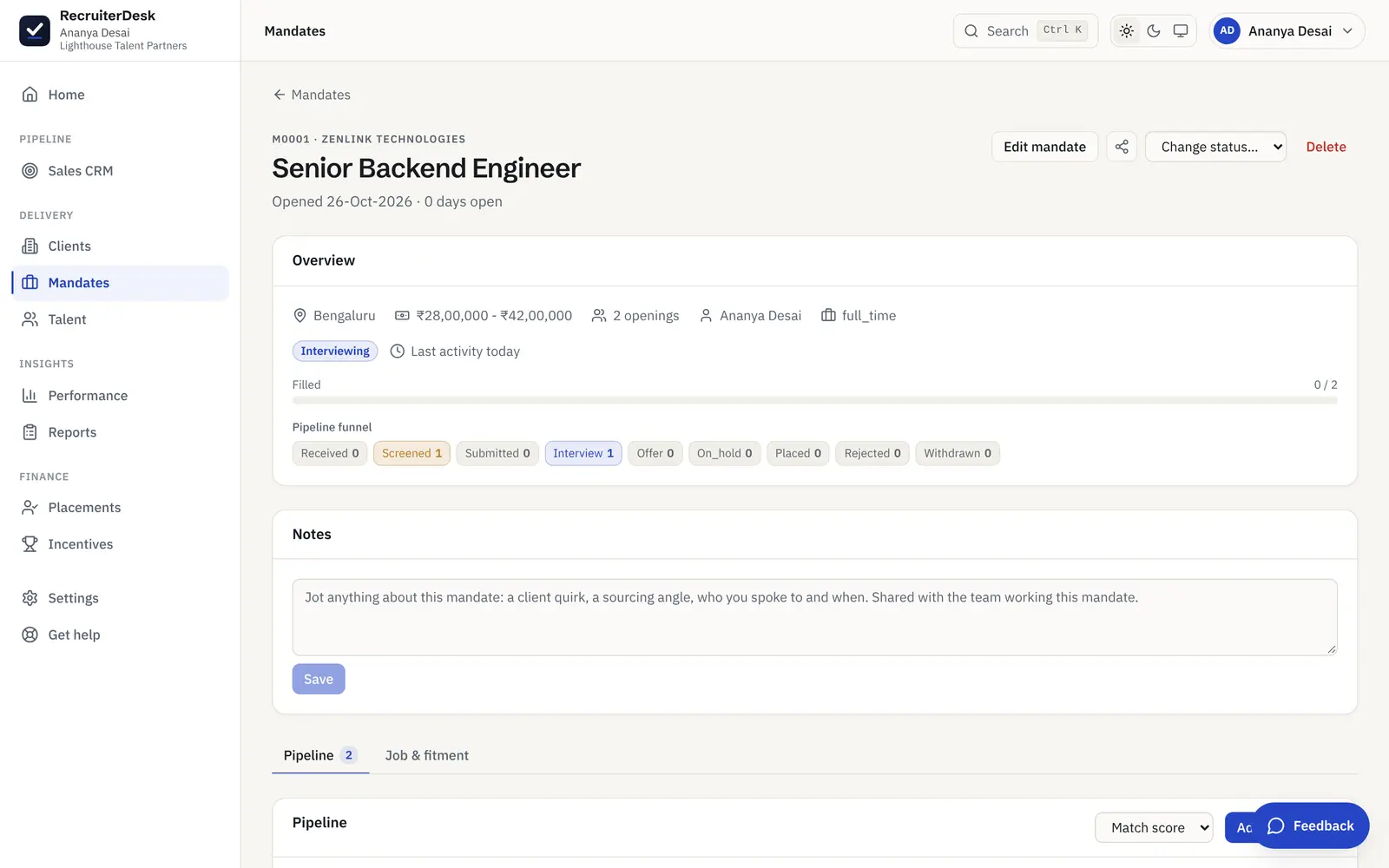
Share your shortlist. Get a verdict on each candidate.
Stop decoding a client’s feedback from a long email chain. Submit your screened candidates, publish a no-login review link, and let the client mark each one shortlisted, maybe or passed with a comment. Every verdict lands back on the mandate, so you always know where you stand.
From a shortlist to a clear decision, in three steps.
Submit the shortlist
Send each candidate to the client from the recruiter’s own name, with the fitment scorecard attached. The shortlist is the people you have already screened, never the whole pipeline.
Publish a review link
Publish a no-login review link for the mandate and share it however you like. The client opens it in a browser, with no account to create and no password to chase.
Get a verdict on each
The client marks each candidate shortlisted, maybe or passed, with a comment. The verdict lands back on the mandate and on the candidate, so you work from a decision, not a guess.
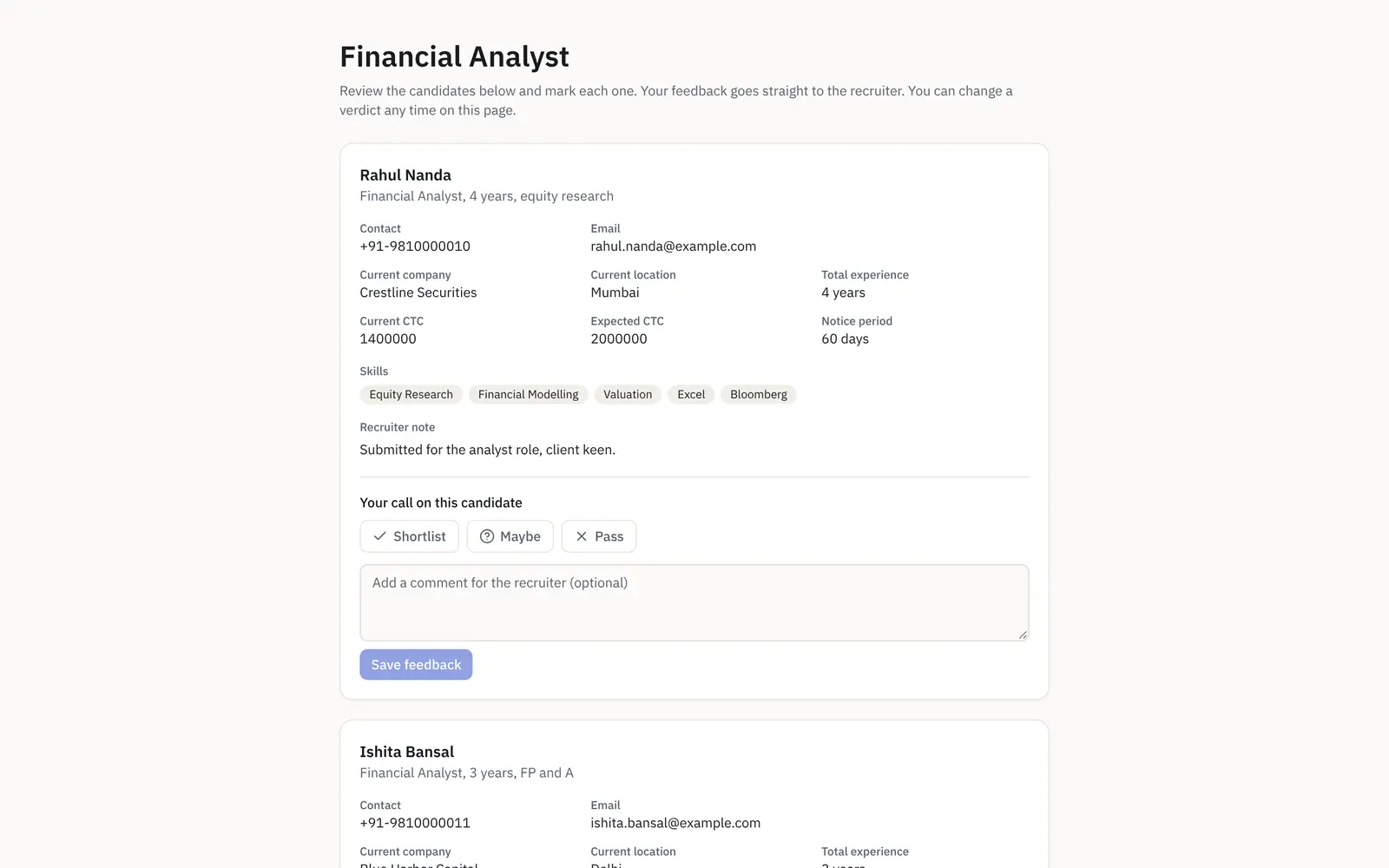
A page the client can act on in one tap.
The review link is a no-login page the client opens in a browser. They give each candidate a yes, maybe or pass with a comment, and that is it. No account, no password, no attachment to download, and nothing of yours they should not see. You can publish it in blind mode, so the phone and email on every candidate are masked and resumes open with the contact details covered. The decision comes back to you on the mandate the moment they give it.
- One verdict and a comment per candidate
- Blind mode masks phone and email on the page
- Decisions land on the candidate’s Submission tab, with the date
- Pause the verdicts or take the page offline, link URL kept
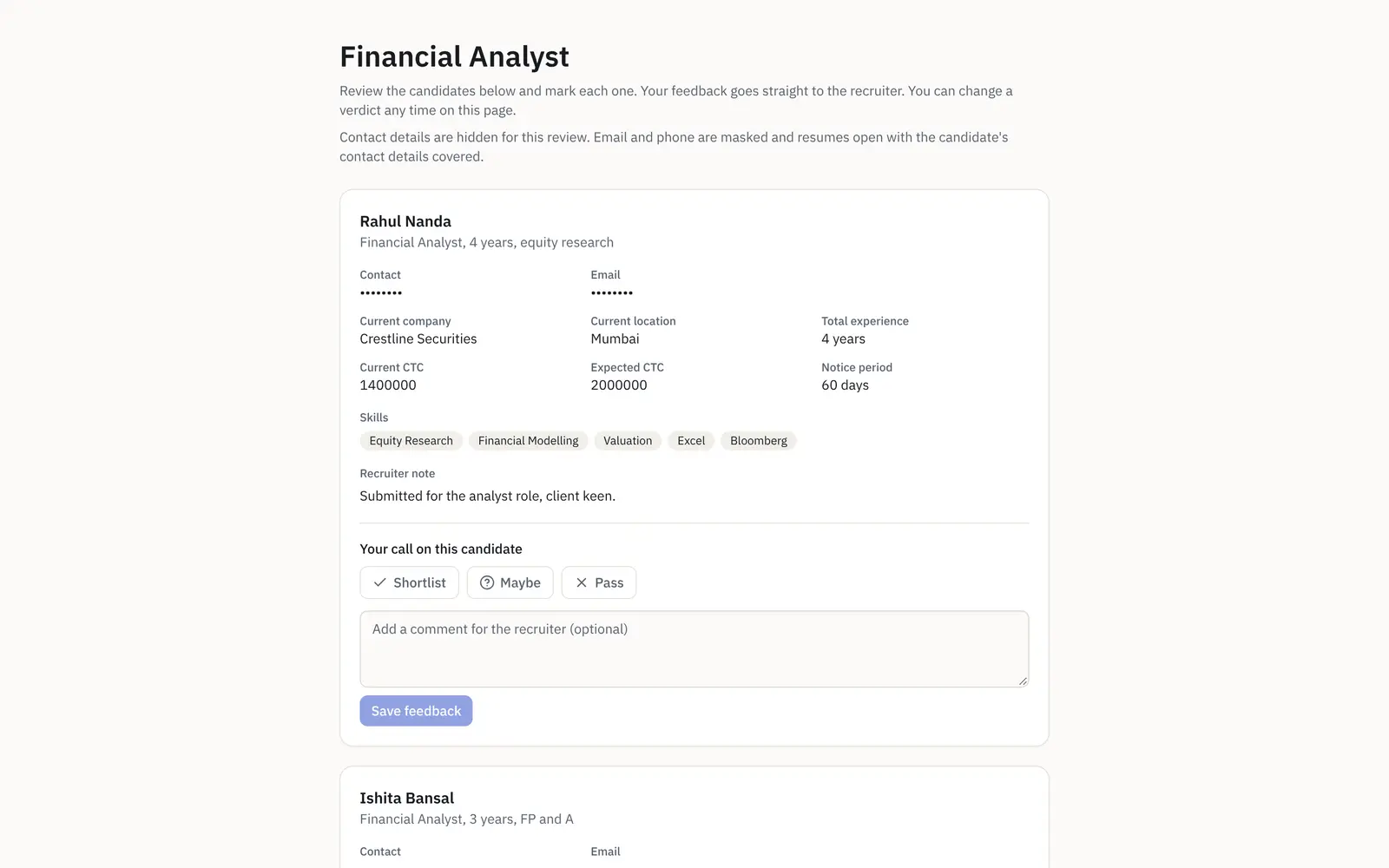
Built for the way a client actually gives feedback.
Yes, maybe or pass
One clear verdict per candidate, with a comment box, so a client decision is a tap rather than a reply-all thread you have to chase and decode.
Verdicts land on the mandate
Each decision shows on the candidate’s Submission tab with the client’s comment and the date, and a client pass prompts you to close the loop. Nothing changes stage on its own.
Pause or take it offline
Pause locks the verdicts while the page stays viewable, and Unpublish takes it offline. Feedback already given is kept, and the link URL is stable, so the same link works again when you republish.
Only what the client should see
The review page shows the candidates you have submitted, never the internal, rejected or withdrawn ones, and never your fee or your notes to yourself.
Share the candidate, not your contact list.
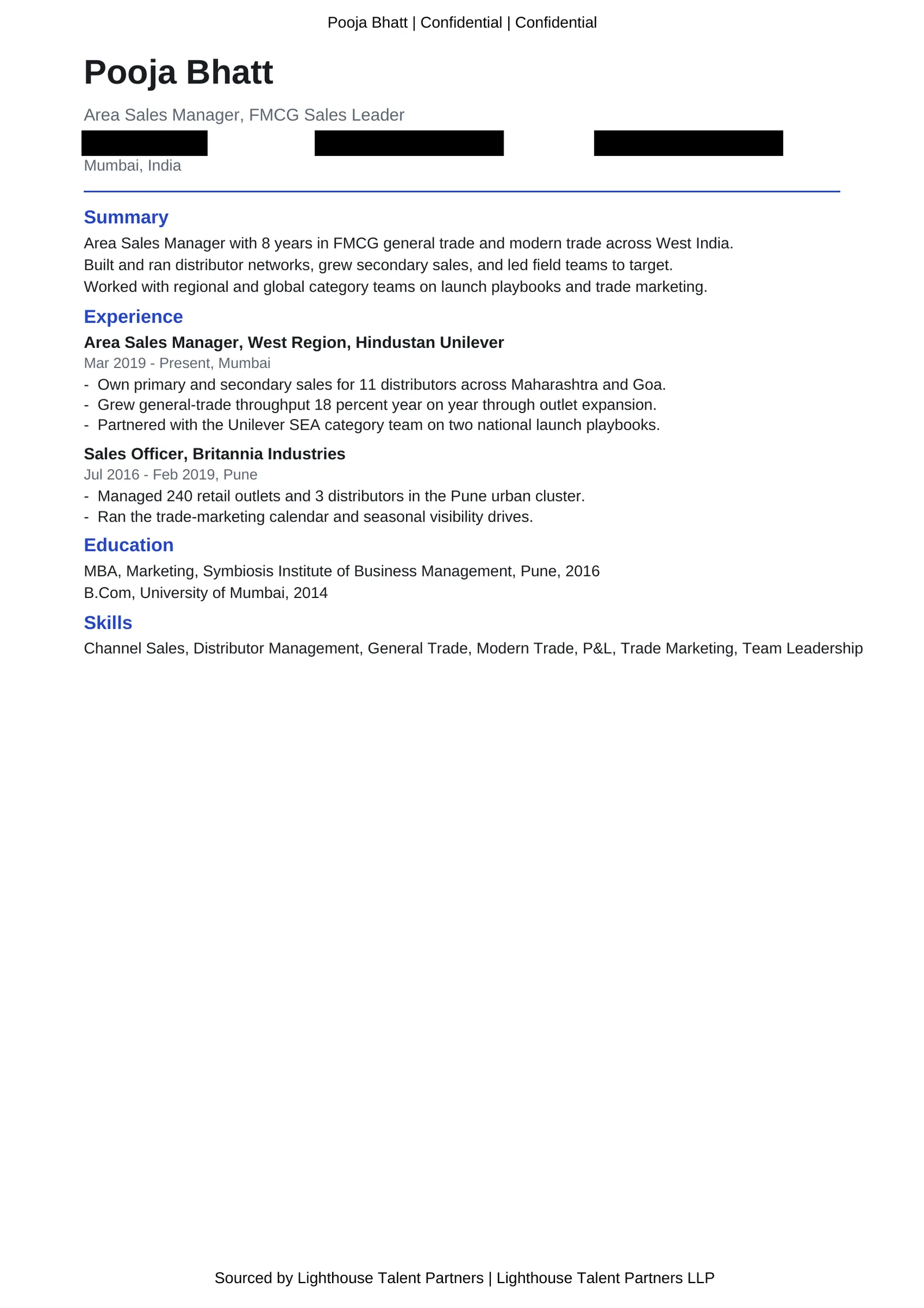
When you send a resume to a client, take a blind copy that covers the phone, email and LinkedIn and keeps the name, so the client assesses the person without a direct line that routes around you. Every page can carry a sourced-by header and footer, so your name travels with the CV. Less personal data leaves your workspace, and the candidate relationship stays with you.
- Phone, email and LinkedIn covered, name kept
- A sourced-by stamp on every page
- Portfolio links left alone as work samples
Give the client a live status, not another meeting.
Confidential resume share
Share a resume with the client with the phone, email and LinkedIn covered and the name kept, so they assess the person without a direct line around you. Portfolio links stay as work samples.
A sourced-by stamp
Every page of a shared resume can carry a header with the candidate’s identity and a footer naming who sourced them, so your name travels with the CV wherever it is forwarded.
A live hiring-status link
Give a client a read-only link to their open roles and the funnel on each: counts only, no candidate names and no login, so they can self-serve a status check without a call.
A weekly status report
Opt a client in to a branded hiring-status report by email, on the day and hour you set in their own timezone, listing the candidates shared so far and where each stands. Download it to send by hand any time too.
The review link is one piece of the whole flow.
Applicant tracking system
Every role as a mandate with its own pipeline, each candidate scored and moved through clear stages to a placement.
See the pipelineRecruitment CRM
The client side on the same desk: a prospect pipeline, full client records, and the hiring-status link.
See the CRMInterview scheduling
Book the interview once the client shortlists a candidate, or let the candidate pick a slot from a no-login link.
See schedulingSharing a shortlist with a client, answered.
How do I share a candidate shortlist with a client?
In RecruiterDesk you submit your screened candidates to the client from your own name with the fitment scorecard attached, then publish a no-login review link for the mandate. The client opens the link in a browser, with no account and no password, and marks each candidate shortlisted, maybe or passed with a comment. The verdict lands back on the mandate, so you work from a clear decision instead of a long email thread.
Does the client need an account or a login to review candidates?
No. The review link is a no-login page: the client just opens it and gives a verdict on each candidate. This is deliberately a review link, not a full client portal. The live client-facing surfaces are the review link and a read-only hiring-status link, not an account-based portal.
What does the client actually see on the review link?
Only the candidates you have submitted, with the detail you chose to share and a yes, maybe or pass control with a comment box on each. Your internal notes, your fee, and any rejected or withdrawn candidates are never shown. When you share a resume you can also take a blind copy that covers the phone, email and LinkedIn while keeping the name, so less personal data leaves your workspace.
Where do the client’s decisions go?
Each verdict shows on the candidate’s Submission tab with the client’s comment and the date it was given, and it is folded into the candidate’s activity timeline. A client pass surfaces a prompt to reject the candidacy and close the loop, but nothing changes stage on its own: you stay in the loop and decide.
Can I stop a client seeing the shortlist after I have shared it?
Yes. Pause locks the verdicts while the page stays viewable, and Unpublish takes the page fully offline behind a confirmation. Feedback already given is kept either way, and the link URL is stable and never regenerated, so the same link works again the moment you republish it.
Can a client see where their roles stand without me sending an update?
Yes. A read-only hiring-status link shows a client their open roles and the funnel on each, with counts only, no candidate names and no login. You can also opt a client in to a branded weekly hiring-status report by email, sent on the day and hour you set in their own timezone, and download the same report to send by hand whenever you want.
More on working with clients: client management for recruiters and how to reduce candidate rejection rates.
- 14-day free trial The whole product, no credit card and no setup call.
- One flat price Every feature included, no per-feature upsells or tiers.
- Your data is yours Export it or delete it whenever you want.
Let your client decide in a tap.
Submit a shortlist, share a no-login link, and get a yes, maybe or pass on each candidate, back on the mandate. Free for 14 days, no card.